
Your Greetyr Setup Guide: Set Up in Under an Hour, Step by Step
Most church staff hear "new software" and picture a month of evenings. Here is exactly what setting up Greetyr involves, screen by screen, with real times from the churches that have done it, plus the one step that actually takes the longest and how to get it done in a day.
It is a Tuesday afternoon in the church office.
The bulletin for Sunday is half done. The copier is jammed again. There are two voicemails about the funeral on Thursday and one about the youth group's fundraiser money that nobody can find. And in the inbox, forwarded from the pastor with no other comment, is an email about a digital greeter for the church website. The pastor's whole message is four words.
"Can we do this?"
If you are the person who got that email, you probably know what "can we do this" really means. It means can you do this. You are the church administrator, or the parish secretary, or the office manager, or the deacon who is "good with computers," or the volunteer who built the website in 2019 and has been the only one who knows the password ever since. Whatever your title is, you are the one who will be setting this up. And you already have a full week.
So the real questions are not about features. They are much more practical than that. How long is this going to take? Am I going to need to know how to code? And what happens six months from now when something breaks and I'm the only one who knows how it works?
This post answers those questions as honestly as we can. We are going to walk through setting up Greetyr one screen at a time, tell you what each screen asks for, and tell you how long each part actually took for the churches that have already done it. We will also tell you about the one step that takes the longest. (It is not the part you would guess, and it has nothing to do with our software.)
The worry behind "is this complicated?"
Most churches are not short on good ideas. They are short on hours.
The typical American congregation has about 70 people who regularly take part in its life, counting kids, according to the National Congregations Study. More than a third of congregations (37 percent) have no full-time staff at all, and the median congregation has exactly one full-time paid staff person.1 Faith Communities Today, which surveyed more than 15,000 congregations across just about every tradition, found that 65 percent worship with fewer than 100 people on a typical weekend, and that a third of smaller congregations are led by a part-time pastor.2
So in most churches, "the tech person" is one staff member with ten other jobs, or a volunteer who fits the website in after work.
That is the context every piece of church software walks into. It is not that church staff can't learn new tools. Plenty of parish secretaries could run a mid-sized company's back office with their eyes closed. It is that every new tool competes with the bulletin, the funeral, the copier, and the person standing at the office door who needs to talk.
And when the tool involves AI, there's a second worry on top of the first one. When Lifeway Research surveyed 1,003 Protestant pastors in late 2025, only 10 percent said they were regular users of AI. Another 18 percent said they were "waiting to see better examples." And 84 percent worried that anything AI produces has to be checked, on the assumption that it contains mistakes. "Pastors' highest concerns are tied to how trustworthy AI's information is," said Scott McConnell of Lifeway Research.3
Both worries are fair. So "is this complicated?" is the right question to ask. Here is the answer.
Before you start: what to have ready
You do not need much. Gather these before you sit down, and the whole thing goes faster.
- Your church's website address. The full one, like
stmarkschurch.org. - About 45 minutes. You can stop and come back, but most churches finish in one sitting.
- A card for the free trial. You aren't charged today.
- A few documents, if you have them. Your welcome or newcomer brochure, a recent bulletin, a ministry guide, a staff directory. PDFs and Word documents both work. This is optional, but it helps.
- The name of whoever can edit your website. If that's you, great. If it's a volunteer, a web company, or your diocese or conference, find out who it is now. You will need them for about ten minutes at the very end, and this is the step that slows most churches down.
That's it. You do not need to type up your service times, write a list of frequently asked questions, or "train" anything. We will get to why in a minute.
Step 1: Tell us about your church
(The screenshots in this post are from a real setup we did while writing it, for our demo church, The Greetyr Church.)
First you create an account with your email and a password, confirm your email, and pick a plan. Plans are sized by your church's average weekly attendance, so you choose the one that fits your size and start your free trial.
Then the setup screen asks for four things:
- Your church's name.
- Your denomination or tradition. This one matters more than it looks. A visitor who asks "Do I need to be confirmed to take communion?" should get a different answer at a Lutheran church than at a Baptist one, and a different answer again at a Catholic parish or an Orthodox one. Greetyr uses your tradition to get the words right, so it says Mass and not service when it should, and it knows what a vestry is, and doesn't confuse an altar call with the Eucharist. (We wrote a whole post on why a church greeter has to know your denomination.)
- The language your greeter should answer in. Some plans can answer in two.
- Your time zone, which is filled in for you from your browser.
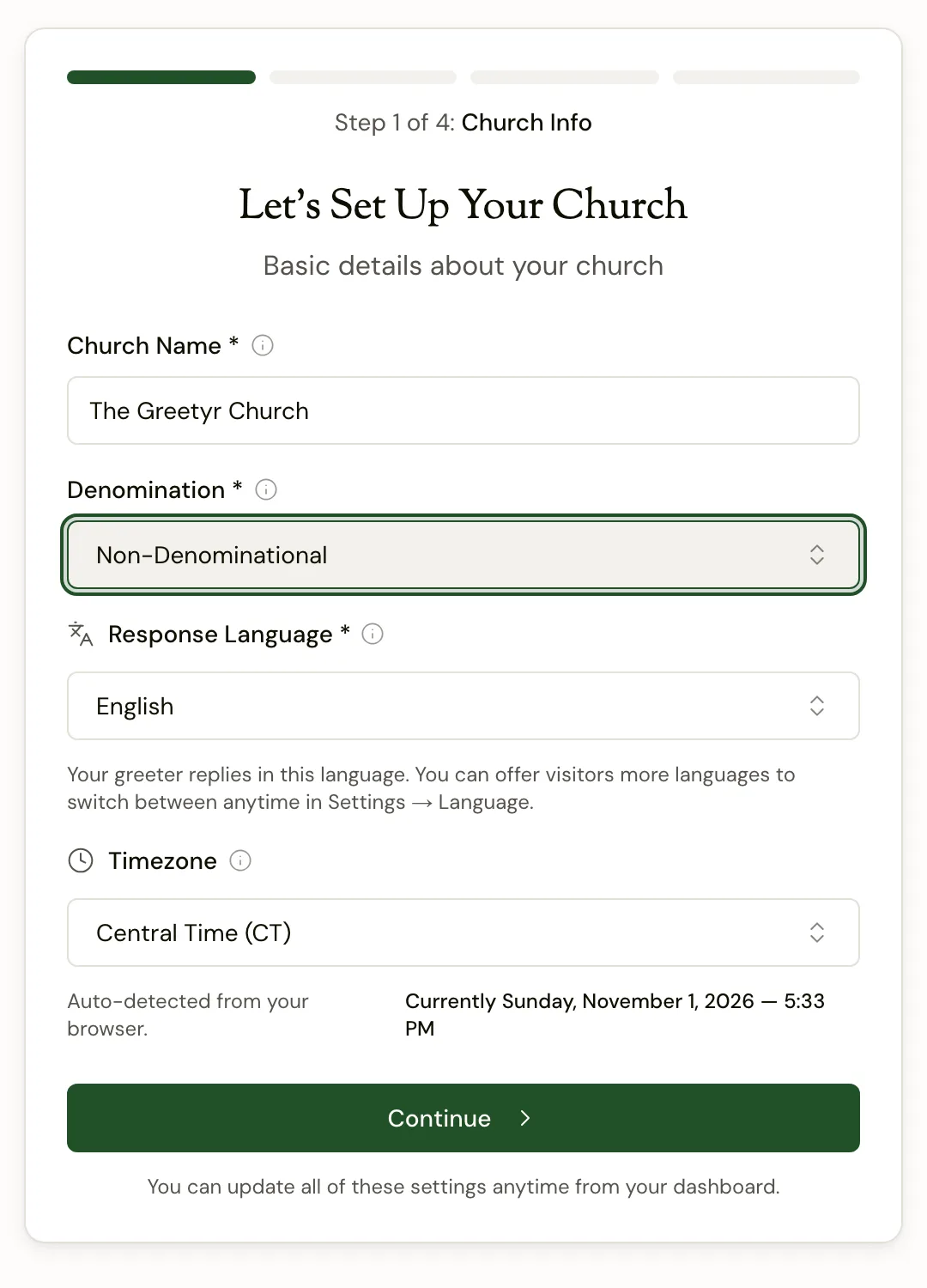 Step 1. Four questions, and the time zone fills itself in.
How long it takes: two or three minutes, plus however long the email confirmation takes to land in your inbox.
Step 2: Make the greeter yours
This step is about how your greeter looks and introduces itself. Everything on it is optional, and you can change all of it later.
- A color to match your website.
- A face. Pick one of four illustrated faces.
- A name. Some churches like a name, like Grace or Hope. Some just want "St. Mark's" or "Welcome." Up to you.
- A welcome message, the first thing a visitor sees.
- A general email address for the church office, so the greeter knows where to send someone who needs a person.
- Your social media links, so the greeter can share them when someone asks.
- A few quick-reply buttons that show up when a visitor first opens it, like "Service times" or "Plan a visit."
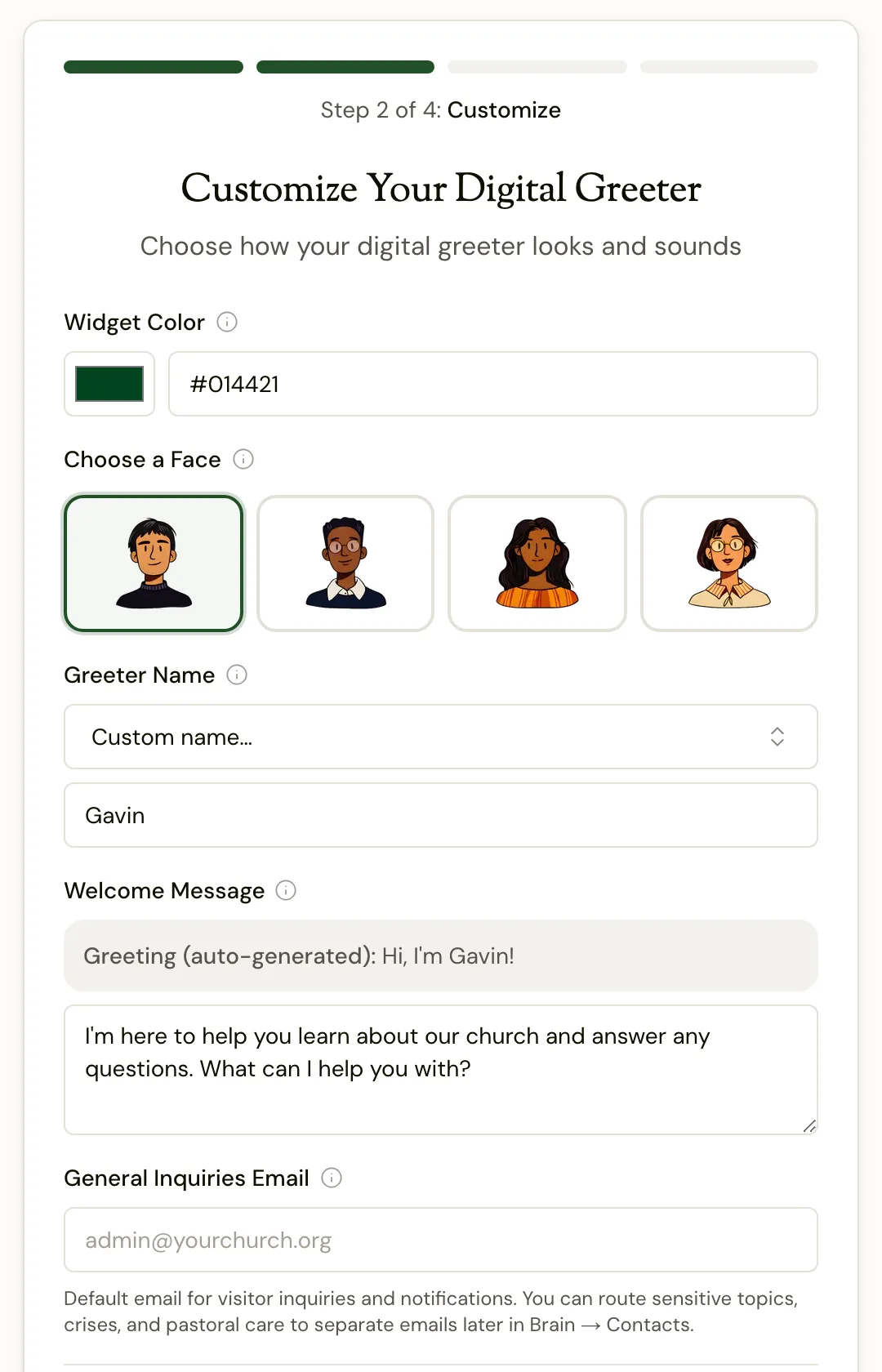 Step 2. Everything here is optional and can be changed later.
Notice what is not on this list: tone of voice. You do not have to describe how your church talks. Greetyr picks that up from your website in the next step. A Catholic parish that writes "Join us for Holy Mass" and a church plant that writes "Grab a coffee and come as you are" will each get a greeter that sounds like them.
How long it takes: about five minutes, or less if you skip it and come back later.
Step 3: We learn your church
This is the step most people expect to be hard, and it's the one where you do the least.
You paste in your website address and click Sync Website. Then Greetyr goes and reads your website, the way a very patient new staff member would on their first day. It finds every public page it can, whether your site is on WordPress, Squarespace, Wix, one of the church website platforms, or something a volunteer built by hand. It reads each page and pulls out what visitors usually need:
- Your service and Mass times, including more than one campus or location if you have them
- Your address and where to park, if your site says
- Upcoming events
- How to give online
- Staff and who to contact for what
- How your church talks about itself, so answers sound like you
For the churches that have set up so far, reading the website took anywhere from 2 to 32 minutes, and most were done in about 10. Those sites ranged from 29 pages to more than 850. When we set up our demo church for this post, the first 50 pages were read in under a minute.
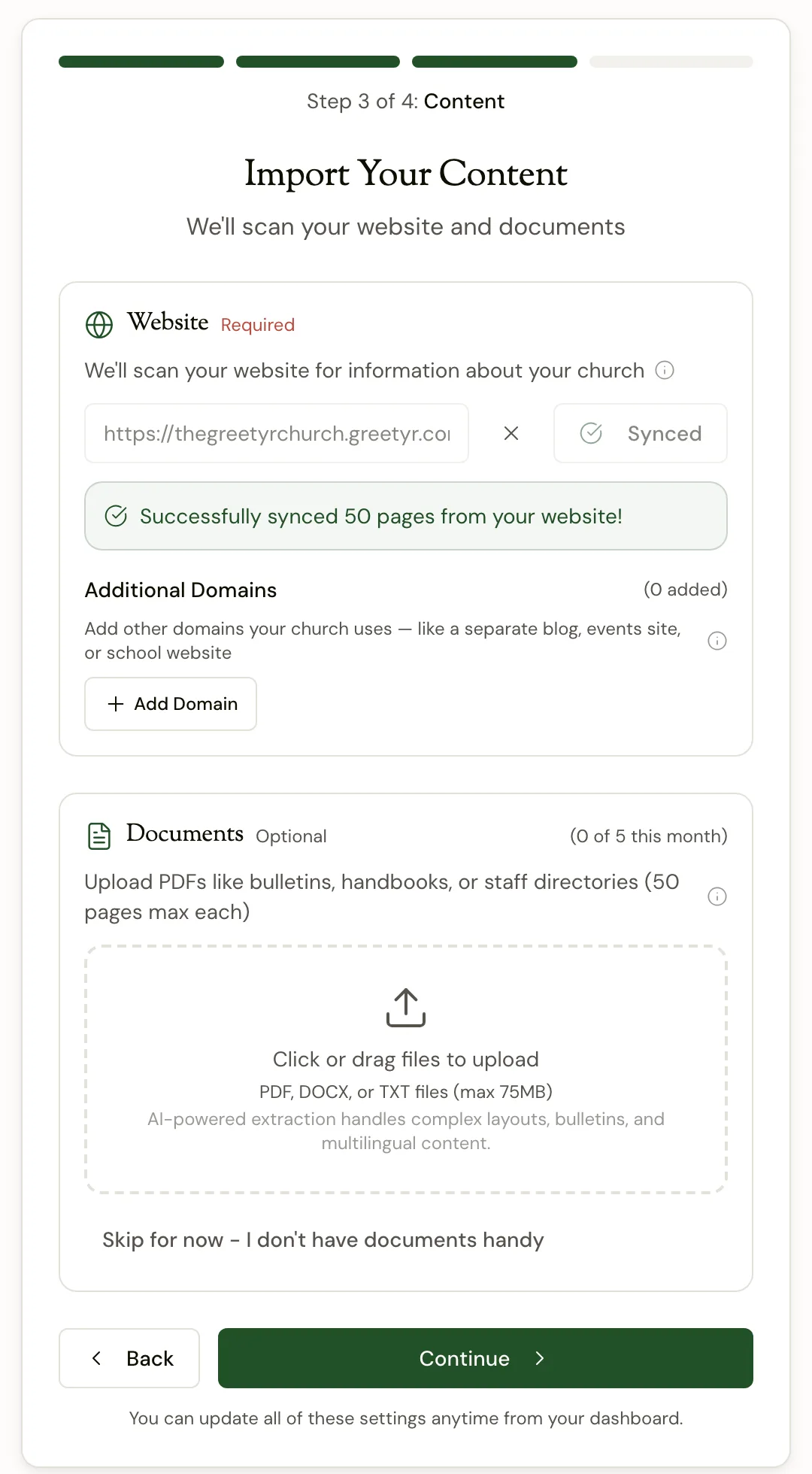 Step 3. Paste your website address, click Sync Website, and add any documents.
While it reads, you can upload documents. This is where you put the things that are not on your website, or are buried somewhere on it. Your newcomer brochure. Last Sunday's bulletin. The children's ministry handbook. The sacrament prep packet. A ministry fair guide. PDFs, Word documents and plain text files all work, up to 50 pages each.
A lot of churches have their best visitor information in exactly these documents, and almost nobody finds it there. The bulletin has the summer schedule. The welcome packet has the answer to "What do I wear?" Upload them, and the greeter can answer from them too.
How long it takes: 10 to 30 minutes, but most of that is waiting. You can fill out the next step while it reads.
Step 4: A few finishing details
The last screen fills in the details most churches forget are separate questions.
- Campus locations. Greetyr suggests the addresses it found on your site. You confirm which ones are real campuses and pick your main one.
- Giving. Tell it how people can give: online, in person, or both. Until you do, it uses whatever giving information it found on your website.
- Team contacts. It suggests staff and ministry leaders from your website, so a question about the youth trip can go to your youth director instead of the general inbox.
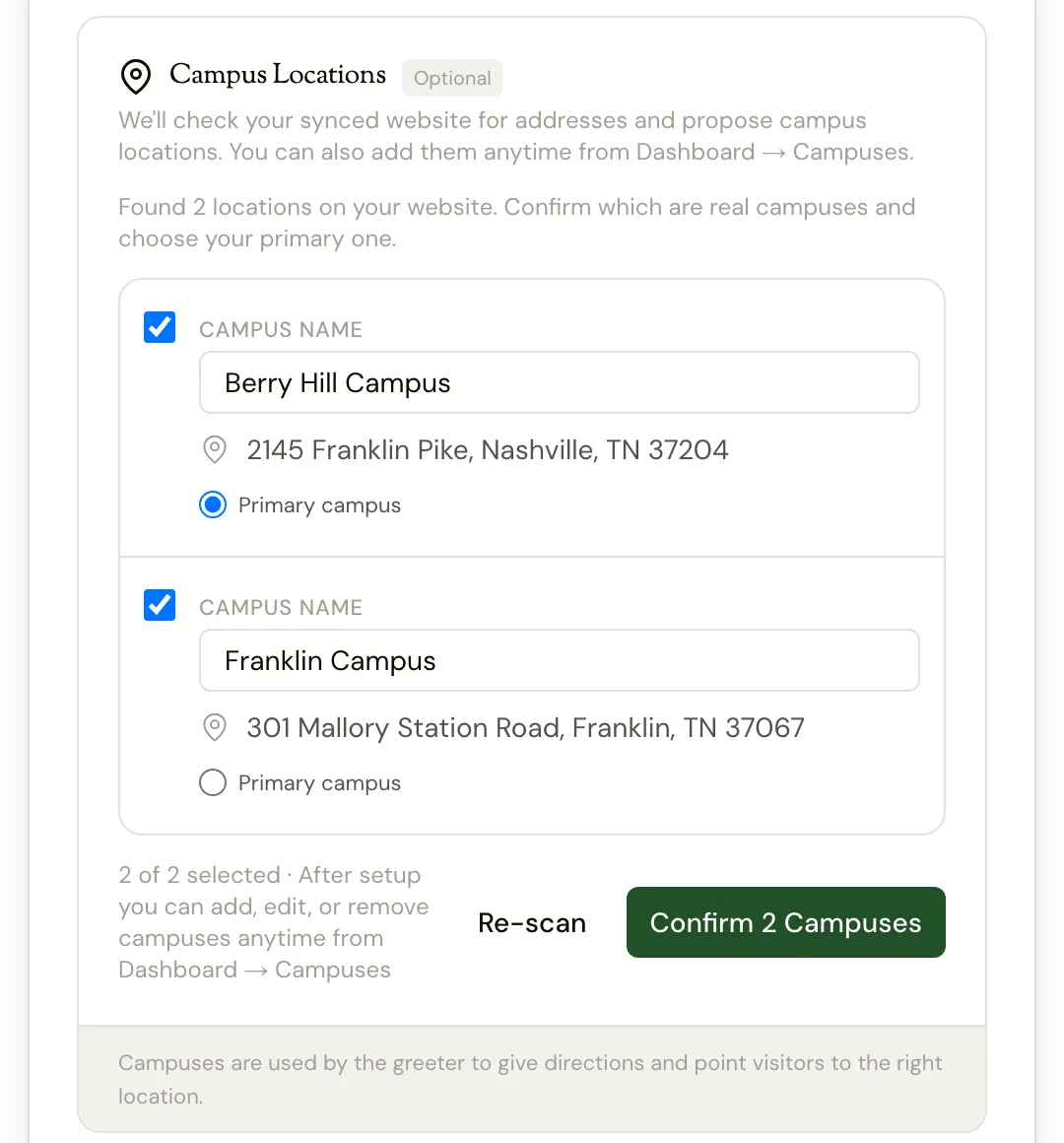 Step 4. It found both of our demo church's campuses on its own.
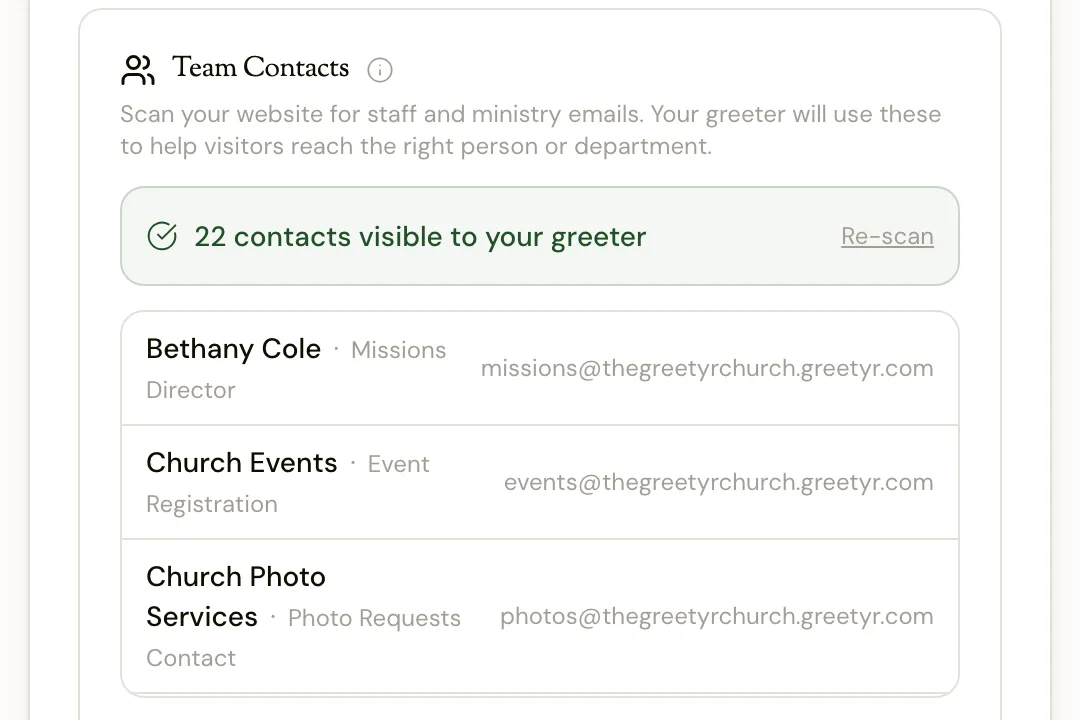 And 22 staff and ministry contacts, so questions go to the right person.
Everything here is optional, and you can come back to it from your dashboard any time. Then you click Go to Dashboard.
How long it takes: five to ten minutes.
For the first churches that set up Greetyr on their own, the setup screens took somewhere between 20 minutes and just under an hour, and most were done in about half an hour.
Before anyone else sees it: test it
Your greeter is ready now, but nobody outside your office can see it yet. That is on purpose. Before it goes on your website, you should try to break it.
Open the preview from your dashboard. It shows your actual website with your greeter on it, so you see exactly what a visitor will see.
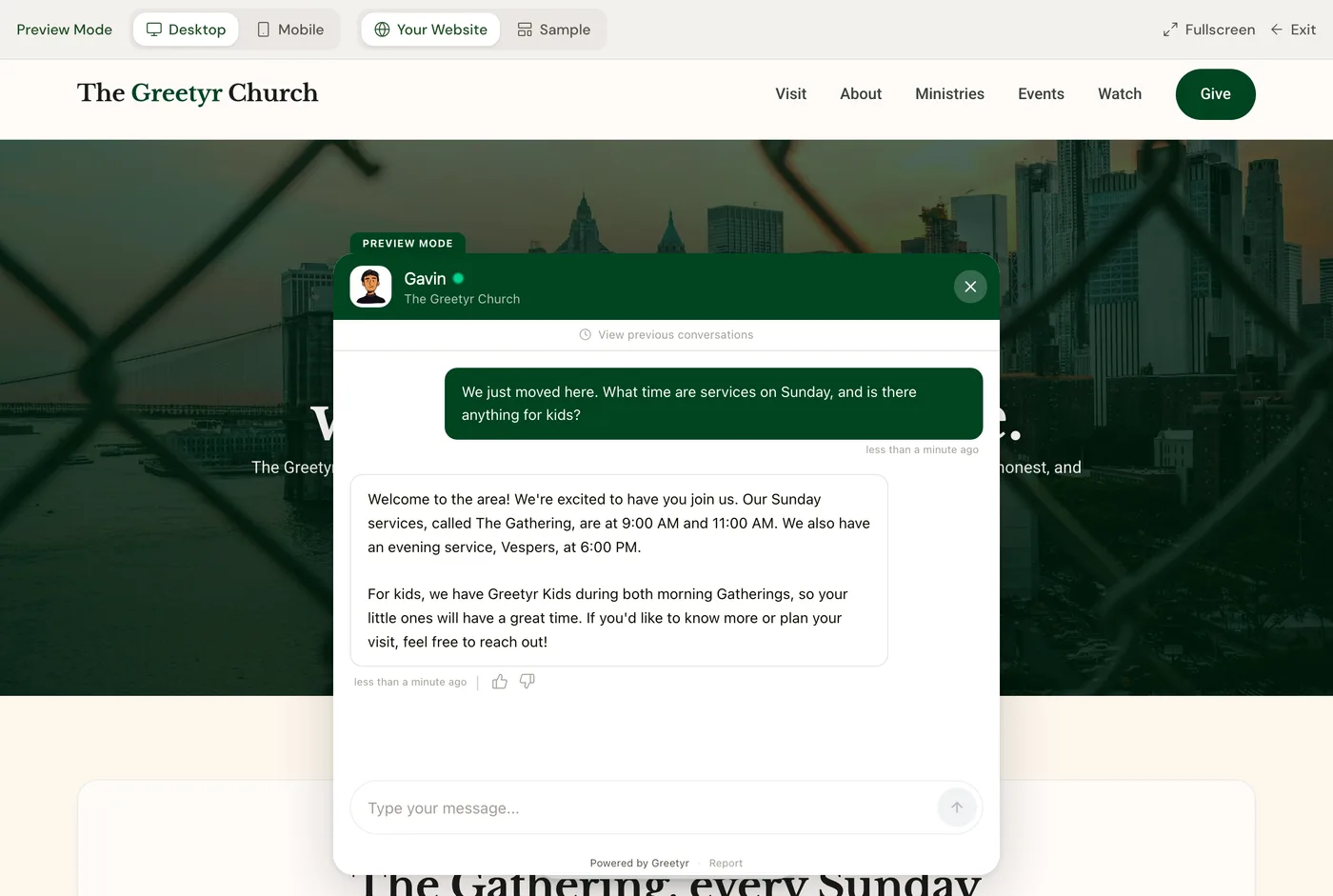 Our first test question. The answer came from the demo church's own website.
Then ask it what a visitor would ask. Here is a good list to start with. (We have a longer one in the questions every church visitor asks.)
- What time are services on Sunday? (Or Mass, or Divine Liturgy, or worship.)
- Where do I park?
- What do I do with my kids?
- What should I wear?
- Do I have to be a member to take communion?
- How do I get my baby baptized?
- Is there anything for people in their twenties?
- How do I give online?
- Who do I talk to about a wedding?
- Something your church gets asked all the time that only your church would know.
You will probably find a question or two it can't answer well. That is useful. Almost every time, it is because the answer is not on your website, or it is on a page that's out of date. Fix the page or upload the document that has the answer, and the greeter picks it up. (If you want to see your website the way a newcomer does, our 10-question website audit is a good companion to this step.)
If your pastor, your council, or your communications volunteer wants to try it before it goes live, you can make a password-protected preview link from your dashboard. They don't need an account. They open the link, type the password, and try it out on your real website.
How long it takes: 10 to 15 minutes. Longer if your pastor gets into it, which happens more than you'd think.
Step 5: Go live
Here is the step that takes the longest. Not because it's hard. Because it usually involves another person.
Going live has two parts.
First, you prove the website is yours. Greetyr only runs on websites the church has verified, so nobody can put your church's greeter on a site that isn't yours. You do this one of two ways: you add a small record to your domain settings (where your website address is registered), or you upload a small file to your website. Either one takes about five minutes for whoever has access. After that, it can take a few minutes for the change to show up.
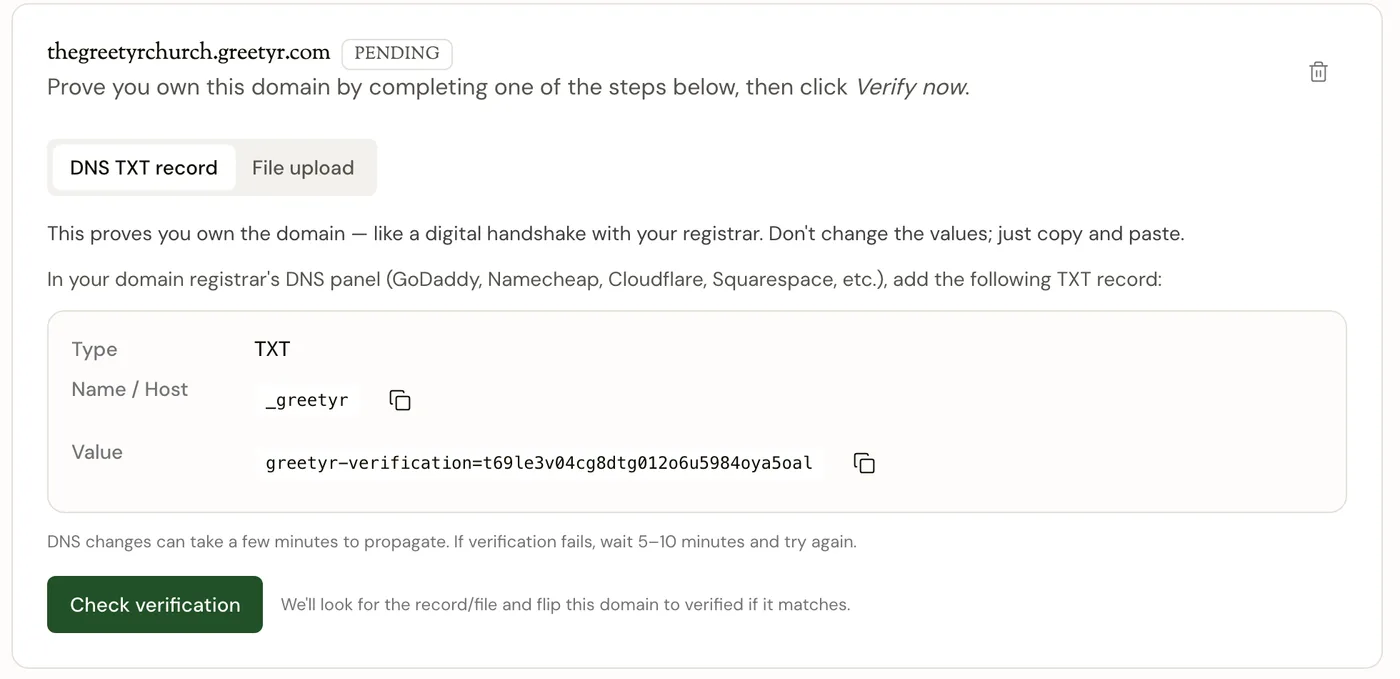 Verifying the website. Copy the record, or switch to File upload, then click Check verification.
Second, you paste one line of code onto your website. Just one line. Greetyr shows you where it goes on the platform you use, with step-by-step instructions for WordPress, Squarespace, Wix, Webflow, The Church Co, eCatholic, Clover, Tithe.ly Sites, Subsplash, Nucleus and others. If someone else manages your website, there's an Email my web person button that sends them the code and the instructions, ready to paste.
Once your website is verified, your greeter goes live on it automatically.
How long it takes: about ten minutes of actual work. For our first churches, verifying the website took 15 minutes for one, 28 minutes for another, and about three days for a third, while they waited to hear back from the person who manages their domain.
That third church is the normal case, and it's worth planning for. In a lot of churches, the website belongs to a volunteer who works full time somewhere else, or a web company that answers email on Thursdays, or a diocese or conference that manages every parish's site. None of that is a problem. It just means you should send that one email on the day you start, not the day you finish.
What it actually takes, start to finish
| Part | What you do | Time |
|---|---|---|
| Create your account | Email, password, choose a plan, start the trial | About 5 minutes |
| Step 1: Your church | Name, tradition, language | 2 to 3 minutes |
| Step 2: Your greeter | Color, face, name, welcome message (all optional) | About 5 minutes |
| Step 3: Your content | Paste your website, upload a few documents | 10 to 30 minutes, mostly waiting |
| Step 4: Final details | Confirm campuses, giving, contacts | 5 to 10 minutes |
| Test it | Ask it ten questions a visitor would ask | 10 to 15 minutes |
| Go live | Verify your website and paste one line of code | About 10 minutes of work |
Add it up and the part you do is under an hour. The fastest church went from creating an account to a verified website in about an hour and a half. If someone else manages your website, expect a day or two of waiting for them, and send the email early.
The other way to do this: building your own
Some churches look at all this and think, couldn't we just build one ourselves? There are tools now that let anyone make a chatbot in an afternoon. Someone on your tech team, or a teenager in the youth group, could probably make one this weekend.
They probably could. Making one is the easy part. Here is what the afternoon doesn't include.
Feeding it your church. A general AI tool does not know your church. Someone has to collect everything a visitor might ask about (service times, the nursery, parking, baptisms, weddings, funerals, the food pantry hours) and put it in. Then someone has to do it again every time anything changes. And at most churches, something changes every week. The bulletin is new every Sunday. The Christmas schedule is different from the summer schedule. The youth pastor leaves.
Keeping it from making things up. This is the big one. AI tools are very good at sounding sure, even when they're wrong, and an organization is responsible for what its chatbot says.
In 2022, a man named Jake Moffatt asked Air Canada's website chatbot about bereavement fares after his grandmother died. The chatbot told him he could book now and apply for the discount afterward. That wasn't Air Canada's policy, and when he applied, the airline said no. In the dispute that followed, Air Canada argued, more or less, that the chatbot was responsible for its own words. The British Columbia Civil Resolution Tribunal was not impressed. "It should be obvious to Air Canada that it is responsible for all the information on its website," the tribunal wrote. "It makes no difference whether the information comes from a static page or a chatbot."4
New York City learned the same lesson at a much bigger price. In 2024, reporters found the city's official business chatbot telling restaurant owners they could take a cut of their workers' tips, which is illegal.5 It stayed online for almost two more years. When the new mayor shut it down in 2026, he called it "functionally unusable" and said it was costing the city around half a million dollars.6
Now picture that at a church. A visitor is told the wrong Mass time and shows up to a locked door. A mom is told the nursery is open when it closed for the summer. Someone asks about annulments or remarriage or communion and gets an answer that is confident, kind, and wrong for your tradition.
Knowing when to stop. A church website gets questions that are not about logistics. Someone writes at 2 a.m. that they lost their husband last week. Someone asks if God can forgive them. A good greeter knows that's a moment for a person, not a paragraph, and gets that person to your pastor or your care team. A homemade chatbot will happily try to answer.
Privacy. Who sees the conversations? Where are they stored? What happens when a teenager types something that a youth pastor needs to know? These questions deserve real answers before anything goes on a church website.
Maintaining it. And then, six months later, the volunteer who built it moves to Denver. Nobody else knows how it works. It keeps answering with last spring's schedule, and nobody notices for weeks.
This isn't only a church problem. In a 2025 study of how businesses are using generative AI, researchers at MIT found that AI tools bought from specialized companies worked out about 67 percent of the time, and the ones businesses built themselves worked out about a third as often.7 A RAND report the year before noted that, by some estimates, more than 80 percent of AI projects fail, twice the rate of ordinary IT projects.8 Those are businesses with whole IT departments. Most churches have one staff person and a volunteer.
None of this means churches shouldn't use AI. It means the setup you see is the small part. The hard part is everything that has to keep working after the setup, every week, without anyone babysitting it.
That is the part we built Greetyr to carry. It checks your website for changes every week and keeps up with them on its own. It answers from your church's own words and says so when it doesn't know. It sends pastoral moments to people instead of trying to handle them. And when it can't answer something, it adds that question to a list in your dashboard, so you can see exactly what visitors are asking that your website doesn't say.
After you go live: the first week
A few small things make a big difference in the first week.
- Tell your staff it's there. So nobody is surprised when someone says "the website told me the nursery opens at 9:15."
- Look at the conversations after the first weekend. You will learn more about what newcomers want to know in one weekend than in a year of guessing. Lots of churches find a question or two they had no idea people were asking.
- Check the questions it couldn't answer. Each one is a gap on your website. Fix the page, or upload the document, and it's fixed for every visitor after that. A lot of these gaps end up on the same page, so it's worth knowing what a good plan your visit page includes.
- Upload this week's bulletin. Make it a habit, the same way you email it to the congregation.
- Make sure someone gets the notifications. When a visitor asks to talk to a person, you want that email going to someone who will answer it within a day or two. (Here is why the first 48 hours matter so much.)
Count the cost, then start
Jesus asks a practical question in the Gospel of Luke. "For which of you, desiring to build a tower, does not first sit down and count the cost, whether he has enough to complete it?"9 It's a fair question to ask of anything new a church takes on, and church staff ask it of every new piece of software, as they should.
So here is the cost, counted. About an hour of your time. One email to whoever runs your website. And then ten minutes a week, if that, to look at what visitors asked.
What you get for it is a greeter at the door of your website every hour of every day. For a lot of people, it's the first one they meet. In a 2023 Lifeway Research study of churchgoers who had switched churches, 37 percent said they used church websites to look for their new one, and the people who found their church through its website said the most helpful things on it were what the church believes, where it is, and when it meets.10 Those are exactly the questions a greeter answers all day long.
St. Benedict wrote in his Rule, around fifteen hundred years ago, "Let all guests who arrive be received like Christ."11 He didn't say only the ones who come during office hours. And when the first apostles argued about how hard to make it for newcomers to join them, James settled it in one sentence: "we should not make it difficult for the Gentiles who are turning to God."12 Most people looking at your website tonight will never be in your office during the day. Setting this up is one small way of not making it harder than it needs to be for them.
Frequently asked questions
How long does it take to set up Greetyr?
Most churches finish Greetyr's setup screens in about 30 minutes, and the whole process, including testing, takes under an hour of work. Reading your website takes anywhere from a few minutes to about half an hour, depending on its size. Going live on your website requires verifying your domain and pasting one line of code, which takes about ten minutes for whoever manages your site.
Do I need to know how to code to set up Greetyr?
No. You fill out a few screens and paste your website address. The only code involved is one line you paste into your website at the end, and Greetyr gives step-by-step instructions for WordPress, Squarespace, Wix, Webflow, The Church Co, eCatholic, Clover, Tithe.ly Sites, Subsplash, Nucleus and others. If someone else runs your site, you can email them the code from your dashboard.
Do I need to type in our service times and FAQs?
No. Greetyr reads your website and picks out your service times, address, events, giving link, staff contacts and the way your church talks. You can upload documents like a bulletin or welcome brochure for anything that isn't on your website. You review and correct things in your dashboard, but you don't have to write them from scratch.
What documents should a church upload?
Upload the documents a newcomer would find helpful: a welcome or newcomer brochure, a recent bulletin, a children's or youth ministry guide, sacrament or membership class information, and a staff directory. PDFs, Word documents and plain text files work, up to 50 pages each.
What happens when our website changes?
Greetyr checks your website every week and picks up changes automatically, so a new event or updated schedule makes it into your greeter's answers without you doing anything. You can also re-sync your website from the dashboard any time, for example right after you post your Christmas schedule.
Can our pastor or council try it before it goes live?
Yes. You can preview the greeter from your dashboard, and you can create a password-protected preview link for people who don't have a Greetyr login, like a pastor, a council member, or a communications volunteer. They can try it on your real website before any visitor sees it.
Why does Greetyr need us to verify our website?
Verifying your domain proves that the website belongs to your church, so no one else can put your church's greeter on a site you don't control. You either add a small DNS record or upload a small file to your website. Once it's verified, your greeter goes live automatically.
Is it hard for a church to build its own AI chatbot?
Building a basic chatbot is easy. Keeping it accurate is the hard part. Someone has to load your church's information, update it every time something changes, test that it doesn't make up answers, decide what happens to visitors' private information, and make sure pastoral or crisis questions go to a real person. Most homemade church chatbots work fine for a few weeks and then quietly go out of date.
Greetyr is a digital greeter for church websites. It answers visitors' real questions in your church's own words, day or night, and hands anything pastoral to the people in your building who should be holding it. If you are still deciding whether your church needs one, start with what happens at 11pm on a Saturday night and why your digital greeter never sleeps.
Footnotes
-
National Congregations Study, Wave IV (2018-19), "Continuity and Change in American Congregations," Table 1, Mark Chaves, principal investigator. Median number of people regularly participating in the congregation's religious life: 70 in 2018-19 (80 in 1998). Percent with no full-time staff: 37.2%. Median number of full-time paid staff: 1.0. Percent with a full-time head clergyperson or leader: 70.1%. See: sites.duke.edu/ncsweb. ↩
-
Scott Thumma, Twenty Years of Congregational Change: The 2020 Faith Communities Today Overview (Hartford Institute for Religion Research, 2021), based on 15,278 congregations. "Nearly two-thirds (65%) of congregations had weekly worship attendance of less than 100 people." Among the smallest 70% of congregations, "a third of these congregations have part-time religious leaders." See: faithcommunitiestoday.org. ↩
-
Aaron Earls, "Pastors, Churchgoers See AI as Concerning and Confusing," Lifeway Research (April 21, 2026). Phone survey of 1,003 Protestant pastors, September 2 to 24, 2025. "One in 10 pastors (10%) say they are regular users of artificial intelligence"; 18% are "waiting to see better examples"; 84% are concerned that AI content "must be edited, assuming it contains errors." See: research.lifeway.com. ↩
-
Moffatt v. Air Canada, 2024 BCCRT 149 (February 14, 2024), para. 27. Air Canada was ordered to pay $812.02 CAD. See: decisions.civilresolutionbc.ca. ↩
-
Colin Lecher, "NYC's AI Chatbot Tells Businesses to Break the Law," The Markup (March 29, 2024). See: themarkup.org. ↩
-
"Mamdani to Kill the NYC AI Chatbot We Caught Telling Businesses to Break the Law," The Markup and THE CITY (January 30, 2026). The mayor described "an AI chatbot that was functionally unusable" that was "costing the administration around half a million dollars." See: themarkup.org. ↩
-
Sheryl Estrada, "MIT report: 95% of generative AI pilots at companies are failing," Fortune (August 18, 2025), reporting on MIT NANDA, The GenAI Divide: State of AI in Business 2025. "Purchasing AI tools from specialized vendors and building partnerships succeed about 67% of the time, while internal builds succeed only one-third as often." See: fortune.com. ↩
-
James Ryseff, Brandon F. De Bruhl, and Sydne J. Newberry, The Root Causes of Failure for Artificial Intelligence Projects and How They Can Succeed (RAND, August 13, 2024). "By some estimates, more than 80 percent of AI projects fail, twice the rate of failure for information technology projects that do not involve AI." See: rand.org. ↩
-
Luke 14:28 (ESV). ↩
-
Marissa Postell Sullivan, "Church Switchers Identify Factors Behind Their Decision, Expect a Lot From New Congregation," Lifeway Research (November 9, 2023). Survey of 1,001 Protestant churchgoers. 37% relied on church websites when searching for a new church; among those first introduced to their church by its website, the most helpful information was beliefs and mission (67%), location (66%), and worship times (64%). See: news.lifeway.com. ↩
-
The Rule of St. Benedict, chapter 53, "On the Reception of Guests," trans. Leonard J. Doyle. See: archive.osb.org. ↩
-
Acts 15:19 (NIV). ↩